Two Mics, One Stream: How to Use Guest Collabs Without Handing Over the Keys
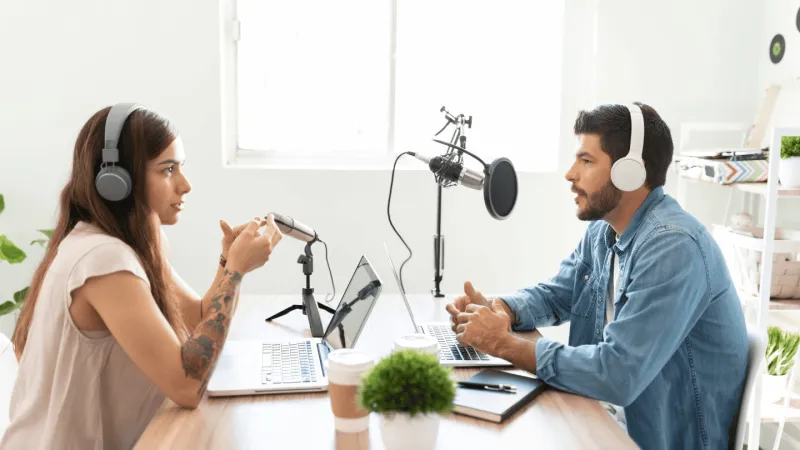
Photo: two people doing live video podcast interview with microphones and laptop, via prbythebook.com
There's a moment every independent streamer eventually hits: you've built a solid core audience, your production is dialed in, and growth has... stalled. You're putting in the same hours, and the numbers just aren't moving. If that sounds familiar, a well-executed guest appearance might be the single highest-leverage move available to you right now.
But here's the thing nobody talks about—bringing someone else into your stream is one of the fastest ways to either double your momentum or quietly wreck the vibe you've spent months building. The difference almost always comes down to preparation.
Why Collabs Work (When They Work)
The math is pretty straightforward. If you have 500 regular viewers and your guest has 800, and even a fraction of their audience tunes in out of curiosity, you've just introduced your show to people who would never have found you through an algorithm. Better yet, a live collab creates urgency—it's a one-time event, and live audiences respond to that.
Beyond the raw numbers, a great guest signals credibility. When someone your audience respects shows up in your stream, it's a kind of social proof. You're not just a person talking into a camera anymore; you're someone worth collaborating with.
But the flip side is real too. Bring in the wrong guest—someone whose community has a different culture, different expectations, or just a different vibe—and you might spend weeks cleaning up the mess in your chat and rebuilding the trust of your regulars.
Vetting Before You Invite
Before you send a single DM, do your homework. Watch their recent streams or videos. Read their comment sections. Check how they handle conflict or controversy when it comes up. You're not looking for perfection—you're looking for alignment. Do they treat their audience with respect? Do they stay on topic? Are there any red flags that would make your existing viewers uncomfortable?
It also helps to think about complementary niches rather than identical ones. A gaming streamer bringing on another gaming streamer can work, but a gaming streamer bringing on a game developer or a competitive coach creates something genuinely different—and gives both audiences a reason to stick around.
Have a real conversation before the stream. A quick 20-minute call does more than any email chain. You'll learn how they communicate, whether they're good at listening, and whether the energy feels natural. Chemistry matters in live content the same way it matters in any conversation.
Sorting Out the Tech Before You Go Live
This is where a lot of collabs quietly fall apart. Audio issues, latency gaps, and dropped connections don't just hurt the viewing experience—they make both streamers look unprepared.
If you're bringing a remote guest in, tools like StreamYard, Riverside.fm, or even Discord's Go Live feature give you options depending on your budget and complexity. StreamYard is especially popular for this because it lets you pull in a guest via a browser link, manage their audio and video independently, and keep full control of the output. Your guest doesn't need to install anything, which removes a whole category of last-minute tech headaches.
A few things to lock down ahead of time:
- Do a private test run at least 24 hours before the actual stream. Not five minutes before—24 hours, so you have time to troubleshoot.
- Set input levels separately. Your guest's mic will almost never match yours right out of the box. Build in time to balance audio so neither of you is getting buried.
- Have a backup plan. If your guest's connection drops, what do you do? Decide in advance. Keep a filler segment ready, or agree on a signal to pause and regroup.
- Know who controls what. If you're the host, you should be the one with a hand on the stream controls. Clarify this before you start.
Managing Chat When Two Audiences Collide
This is the part most guides skip over, and it matters more than people realize. When your guest's followers show up, they don't know your chat rules. They don't know your community's inside jokes. They might be perfectly nice people who just communicate differently than your regulars do.
Before the stream, brief your moderators. Let them know to expect a larger, less familiar crowd and to be proactive rather than reactive. If you don't have dedicated mods, this is the time to recruit someone you trust—even temporarily.
At the top of the stream, take 60 seconds to set expectations out loud. Welcome new viewers, point to your channel rules, and frame the tone. It sounds simple, but explicitly setting the vibe at the start makes a real difference in how chat behaves for the rest of the broadcast.
Also, acknowledge both audiences throughout the stream. Don't spend the whole time talking to your regulars while your guest's followers feel like outsiders. A little intentional inclusivity goes a long way toward converting curious visitors into actual subscribers.
Keeping the Momentum After the Guest Logs Off
Here's what separates a one-time spike from actual growth: what you do after the collab ends.
If new viewers showed up for the guest, they need a reason to come back for you. That means ending the stream with a clear call to action—tell them when you go live next, what you'll be covering, and why it's worth their time. Don't assume they'll just figure it out.
Clip the best moments from the collab and post them across your social channels. Tag your guest, let them share it too. That content keeps working for both of you long after the stream is archived.
And follow up with your guest. A genuine thank-you and a recap of how it went opens the door to future collabs—and to being recommended to their network down the road. The best collaborations aren't one-offs; they're the start of a longer relationship.
The guest paradox isn't really a paradox at all. Bringing someone else into your stream does create risk—but it creates a lot more opportunity if you've done the groundwork. Treat it like a partnership, not a transaction, and you'll both come out ahead.